


What is Odoo? ERP Software for Businesses in Thailand
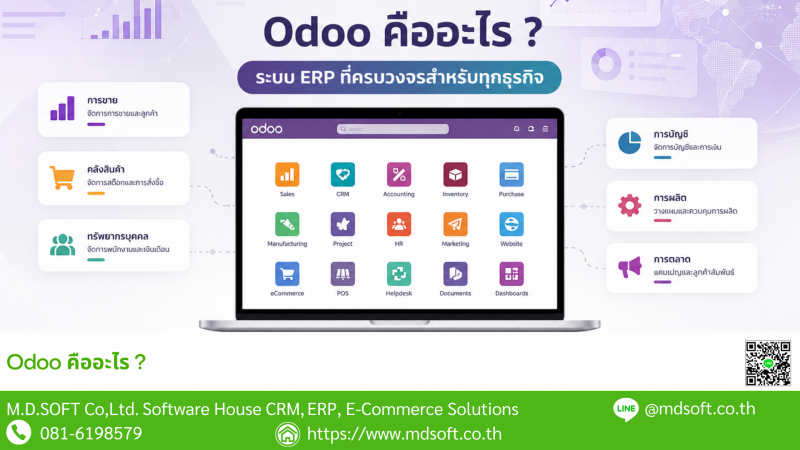
- What is Odoo?
- Odoo explained in one minute
- What can Odoo do?
- What are the main Odoo modules?
- How does Odoo connect business departments?
- What types of businesses can use Odoo?
- Odoo Community vs Enterprise
- How is Odoo different from accounting software?
- Is Odoo suitable for businesses in Thailand?
- Real-world Odoo implementation examples
- A brief history of Odoo
- Main benefits of Odoo
- What should you consider before implementing Odoo?
- What is MDERP?
- Frequently asked questions
- Conclusion
Odoo is an Enterprise Resource Planning (ERP) and business management platform that connects multiple business functions in one integrated system. It can be used for CRM, sales, purchasing, inventory, manufacturing, accounting, point of sale, websites, eCommerce, projects, human resources and many other business processes.
One of Odoo's main advantages is that its applications can share the same business data. This allows information created in one department to flow into the next process without repeatedly entering the same information into separate software systems.
Odoo is available in Community Edition, which provides an open-source core, and Enterprise Edition, which adds additional applications, services and commercial features.
For businesses operating in Thailand, Odoo can also be extended to support local requirements such as Thai accounting and taxation, multi-company and multi-branch operations, POS, manufacturing, warehouse operations and marketplace integration.
What is Odoo?
Odoo is a business software platform designed to bring multiple departments and business processes onto a common database.
Instead of operating one CRM system, another sales system, separate warehouse software and separate accounting software, businesses can use Odoo to connect these processes within one ERP environment.
For example, a customer opportunity can progress through CRM, quotation, sales order, warehouse delivery, customer invoice, payment and accounting without recreating the same transaction in multiple systems.
CRM → Sales → Purchase → Inventory → Manufacturing → Accounting → Reporting
All using connected business data.
What is Odoo? Explained in one minute
| Software type | ERP and Business Management Platform |
| Interface | Web-based and accessible through a web browser |
| Main editions | Community and Enterprise |
| Community Edition | Open-source core that can be extended with additional modules |
| Main development language | Python |
| Database | PostgreSQL |
| Typical applications | CRM, Sales, Purchase, Inventory, Manufacturing, Accounting, POS, Website and eCommerce |
| Key advantage | Business departments can work from connected data in one ERP platform |
What can Odoo do?
Odoo is not only accounting software or CRM software. It can cover many business processes through integrated applications and additional modules.
- Manage leads, prospects and customers
- Track sales opportunities and activities
- Create quotations and sales orders
- Manage purchasing and suppliers
- Manage inventory and warehouses
- Support multiple warehouses and stock locations
- Track lots and serial numbers
- Manage Bills of Materials and manufacturing
- Create customer invoices and vendor bills
- Manage accounts receivable and accounts payable
- Operate point-of-sale systems
- Create websites and eCommerce stores
- Manage projects and tasks
- Manage employees and HR processes
- Produce business reports and analysis
- Connect with external applications through APIs or additional modules
What are the main Odoo modules?
CRM
Odoo CRM helps manage leads, opportunities, sales pipelines, activities and customer follow-up.
Sales
The Sales application can handle quotations, sales orders, customers, price lists and downstream processes such as delivery, invoicing and payment.
Purchase
Purchasing can be managed through RFQs, purchase orders, supplier information, receipts and vendor bills.
Inventory
Odoo Inventory can manage warehouses, locations, stock movements, internal transfers, lots, serial numbers and inventory valuation.
Manufacturing / MRP
Manufacturing features can support Bills of Materials, manufacturing orders, work centers, raw materials and finished goods.
Accounting
Depending on the edition, localization and additional modules, Odoo can support invoicing, vendor bills, payments, general ledger, accounts receivable, accounts payable and financial reporting.
Point of Sale
Odoo POS can be used for retail, restaurants and other businesses that need front-counter transactions connected with inventory and ERP processes.
Website and eCommerce
Odoo can also be used to build websites and eCommerce stores, allowing online orders to connect with sales and inventory processes.
How does Odoo connect business departments?
One of the main reasons companies implement ERP is to reduce duplicate data and disconnected processes.
Example Sales Flow
CRM → Quotation → Sales Order → Delivery → Invoice → Payment → Accounting
Example Purchase Flow
Requirement → RFQ → Purchase Order → Receipt → Vendor Bill → Payment → Accounting
Example Manufacturing Flow
Demand → MRP → Raw Materials → Manufacturing Order → Finished Goods → Inventory → Accounting
is to reduce duplicate data entry and allow sales, purchasing, warehouse, manufacturing and accounting teams to work with connected transactions.
What types of businesses can use Odoo?
Odoo can be adapted to many industries and company sizes, but a successful implementation requires the right combination of standard applications, configuration and customization.
Trading and Distribution
- Sales
- Purchasing
- Inventory
- Multiple warehouses
- Delivery
- Accounting
Manufacturing Companies
- BOM
- Manufacturing Orders
- Raw Materials
- Finished Goods
- Work Centers
- WIP and costing depending on the implemented modules
Retail and POS Businesses
- Point of Sale
- Inventory
- Promotions
- Payments
- Multiple branches
- Accounting integration
Multi-branch Businesses
- Warehouse management by branch
- Stock by branch
- User permissions
- Internal transfers
- Transit warehouse processes
- Branch reporting
Multi-company Groups
Organizations with multiple legal entities can use multi-company structures to separate transactions, permissions and business processes while still operating within one ERP environment.
eCommerce and Marketplace Businesses
Odoo can be integrated with websites, online stores and marketplaces, depending on available APIs, connectors and project requirements.
Service Companies
Service businesses may use Odoo for CRM, sales, projects, expenses, invoicing and internal workflow management.
Odoo Community vs Enterprise: what is the difference?
Odoo is mainly available in two editions: Odoo Community and Odoo Enterprise.
Community provides the open-source core, while Enterprise builds on that core with additional applications, commercial features and services.
| Area | Odoo Community | Odoo Enterprise |
|---|---|---|
| Open-source core | Yes | Uses the Community core with additional Enterprise add-ons |
| Odoo Enterprise subscription | No | Required |
| Python module customization | Supported | Supported depending on deployment and licensing conditions |
| Enterprise applications | Not included in standard Community | Additional Enterprise applications are available |
For a more detailed feature comparison from the perspective of businesses in Thailand, see: MDERP vs Odoo Enterprise | ERP Feature Comparison for Thai Businesses
How is Odoo different from traditional accounting software?
Businesses sometimes discover Odoo while looking for a replacement for their existing accounting software.
Traditional accounting applications often focus primarily on financial transactions such as invoices, accounts receivable, accounts payable, payments and general ledger.
An ERP platform such as Odoo can connect the operational transaction before it reaches accounting.
For example:
Sales Order → Delivery → Customer Invoice → Payment → Accounting
and:
Purchase Order → Receipt → Vendor Bill → Payment → Accounting
This allows the accounting team to trace financial transactions back to the operational documents instead of manually recreating information from other departments.
Is Odoo suitable for businesses in Thailand?
Yes, Odoo can be implemented for businesses in Thailand. However, organizations should evaluate local accounting, taxation, branch, document and reporting requirements before going live.
Thai businesses may require workflows such as:
- Input VAT and Output VAT
- VAT reporting
- Withholding Tax
- Withholding Tax certificates
- PP.30
- PP.36
- RD Prep data preparation
- Billing Notes
- Cheque Management
- Petty Cash
- Fixed Assets
- Head Office and Branch structures
- Tax reports by branch
- Custom Financial Statements
MDSoft has developed additional Thai accounting and business workflow modules under MDERP to support requirements commonly found in Thai organizations.
See more: Odoo Accounting Thailand - Thai Accounting Features on MDERP
Real-world Odoo implementation examples
MDSoft has worked with OpenERP / Odoo across different business processes for more than 15 years. From real implementation experience, ERP projects normally involve more than simply installing standard applications.
Multi-branch POS
Retail businesses may require multiple POS terminals connected to branch-specific stock, payments, promotions and accounting processes.
Transit Warehouse and Goods in Transit
When goods are transferred between branches, some businesses need to know where the stock is after it leaves the source warehouse but before the destination branch accepts the goods.
A transit warehouse or transit location workflow can be designed to track inventory during this transfer process.
Multi-company and Multi-branch Operations
A multi-company group and a multi-branch company have different business requirements.
The ERP design may need to consider:
- User permissions
- Warehouses
- Stock
- Payments
- Document sequences
- Accounting
- Tax reporting
Marketplace Integration
Businesses selling through multiple online channels can integrate orders from marketplaces, websites or external platforms with ERP processes.
- Order synchronization
- Product and SKU mapping
- Stock synchronization
- Price synchronization depending on scope
- Delivery status
- Payment and marketplace fee mapping
- Accounting integration
Thai Accounting and Tax
For Thai ERP projects, financial workflows should ideally be designed from operational transactions through accounting and taxation, instead of treating Thai accounting as a completely separate system.
ERP is not only about having features. The real value comes from connecting multiple features into a business process that matches the organization's actual operations.
A brief history of Odoo
Odoo has evolved through several stages as its scope expanded.
| Period | Name | Development |
|---|---|---|
| Early stage | TinyERP | The project began as an open-source ERP system. |
| Later stage | OpenERP | The platform expanded to support more business applications and larger ERP requirements. |
| From 2014 | Odoo | OpenERP was renamed Odoo as the platform expanded beyond traditional ERP into areas such as websites, eCommerce and POS. |
Today, Odoo is better understood as a modular business platform rather than only a traditional ERP application.
What are the main benefits of Odoo?
1. Integrated business data
Sales, purchasing, inventory, manufacturing and accounting can share connected transactions.
2. Modular implementation
Businesses can begin with the applications they need first and expand later as operations grow.
3. Customization
Odoo provides a development framework that allows additional modules, workflows, business logic and reports to be created for specific requirements.
4. Integration with external systems
Odoo can communicate with external applications using APIs, connectors or custom integration modules.
5. Support for growing organizations
Odoo can be designed for multiple warehouses, companies, branches and larger user populations, provided that the infrastructure and system architecture are properly planned.
6. Open-source Community Edition
Community Edition is particularly attractive for organizations that require flexibility, source-level customization or long-term system development.
What should you consider before implementing Odoo?
Choosing Odoo should not be based only on a product demonstration or the number of applications available.
Businesses should evaluate:
- What is the current business process?
- Which processes should be improved before ERP implementation?
- Which requirements can use standard Odoo?
- Which requirements need configuration?
- Which requirements need customization?
- Should the company use Community or Enterprise?
- Are Thai accounting and tax features required?
- Does the business have multiple companies?
- Does it have multiple branches?
- Does it use POS or multiple warehouses?
- Is marketplace or eCommerce integration required?
- How much data must be migrated?
- How much historical data is required?
- How many users and transactions will the system support?
- What server or cloud resources are required?
- Who will be the key users responsible for UAT?
What is MDERP?
For organizations that want the flexibility of Odoo Community together with additional business functionality for Thailand, MDSoft has developed MDERP.
MDERP extends Odoo Community with modules and workflows developed from real implementation experience, including:
- Thai Accounting
- Thai Tax and reporting
- Multi-company
- Multi-branch
- Point of Sale
- Inventory Management
- Stock Aging
- ABC and FSN Analysis
- Manufacturing
- WIP and Costing depending on implemented modules
- Thai Payroll
- Document Control
- Approval Workflows
- Business Reports
More information: MDERP ERP for Thai Businesses - An Alternative to Odoo Enterprise
Frequently asked questions about Odoo
What is Odoo ERP?
Odoo is an ERP and business management platform that provides integrated applications for CRM, sales, purchasing, inventory, manufacturing, accounting, POS, websites and other business processes.
Is Odoo free?
Odoo Community Edition is open source and does not require an Odoo Enterprise subscription. However, real-world implementation may still involve costs for infrastructure, implementation, customization, data migration, training and support.
What is the difference between Odoo Community and Enterprise?
Community provides the open-source core. Enterprise extends that core with additional applications, commercial functionality and services under Odoo's Enterprise subscription.
Is Odoo suitable for Thai businesses?
Yes. Odoo can be implemented for Thai organizations, but local tax, accounting, branch and documentation requirements should be evaluated during solution design.
Does Odoo support Thai accounting?
Odoo provides Thailand localization and can be extended with additional modules.
MDERP adds Thai accounting features developed by MDSoft, including workflows for VAT, Withholding Tax, PP.30, PP.36, RD Prep, cheques, petty cash, fixed assets, financial reporting and branch-related tax reporting.
Can Odoo support multiple branches?
Odoo can be designed for multi-branch operations, but businesses should distinguish between a legal company and an operating branch.
Warehouse, stock, permissions, payments, documents and accounting should be designed according to the organization's structure.
Can Odoo be customized?
Yes. Odoo supports custom module development for workflows, reports, business logic and integration with external systems.
Can existing business data be migrated into Odoo?
Yes. Migration projects may include customers, suppliers, products, chart of accounts, opening balances, accounts receivable, accounts payable, stock and historical transactions, depending on project scope and source data quality.
How do I choose an Odoo implementation company in Thailand?
Businesses should evaluate not only technical development skills, but also experience with business processes, Thai accounting, data migration, integration, infrastructure, training and post-go-live support.
MDSoft has more than 15 years of experience developing and implementing OpenERP / Odoo solutions for businesses in Thailand.
Conclusion: Is Odoo the right ERP for your business?
Odoo is an ERP and business application platform that can connect multiple departments and business processes within one system.
Its main strengths include modular applications, integrated data, customization capabilities and the ability to extend the system for different business models.
However, a successful Odoo project requires more than selecting software. Businesses should also consider process design, data, accounting, infrastructure, migration, users, integration and local requirements.
MDSoft has been developing and implementing OpenERP / Odoo solutions for more than 15 years and uses this experience to develop MDERP for businesses operating in Thailand.
Looking for Odoo ERP implementation in Thailand?
You can send us your business requirements, current workflow or system challenges for an initial assessment.
The MDSoft team can help identify which requirements can use standard Odoo, which can use existing MDERP modules, which require configuration, and which should be customized.
Related Articles
- MDERP ERP for Thai Businesses - An Alternative to Odoo Enterprise
- MDERP vs Odoo Enterprise - ERP Feature Comparison for Thai Businesses
- Odoo Accounting Thailand - Thai Accounting Features on MDERP
- MDSoft Odoo Service - Odoo Implementation, Customization and Support